Open map from datapoint hierarchy
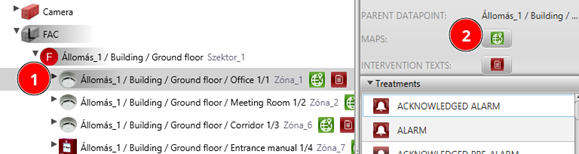
Open the map on which this detector is located

Help: In the Datapoint Hierarchy panel, right-click on the detector and select Show on map. The map containing that detector will open automatically.
ON/OFF from datapoint hierarchy
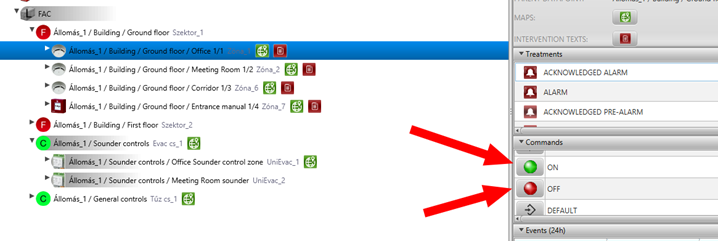
Switch ON-OFF detector this detector from Datapoint Hierarchy:
Help: In the Datapoint Hierarchy panel, right-click on the detector. From the command menu select Switch ON or Switch OFF. Check that the detector state changes in the hierarchy.
Multiselect in Datapoint Hierarchy
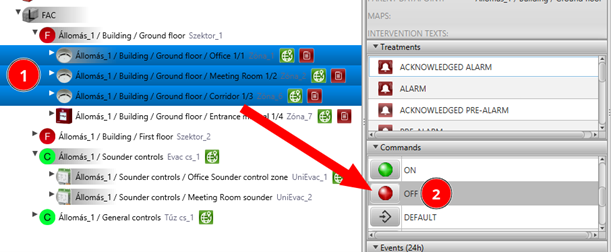
Make a multi-selection and switch them OFF together.
Help: Hold CTRL and click multiple detectors in the Datapoint Hierarchy to select them. Right-click on the selection and choose Switch OFF from the command menu.
Subtree definition
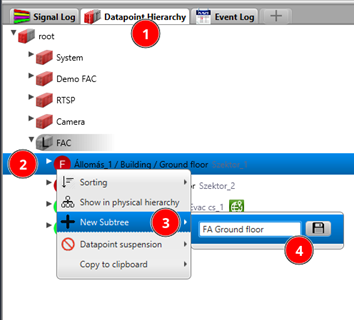
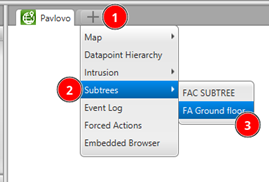
Define a new subtree and then open it in a new tab. A subtree is a shortcut to a certain portion of your entire Datapoint Hierarchy — it is a logical extraction of the tree structure.
Help: In the Datapoint Hierarchy right-click on a branch and select Define subtree. Then open it in a new tab and pin it.